


An avionics tray in a launch vehicle is an equipment interface, a structural support, and part of the vehicle’s service and integration plan. Its function is not simply to hold boxes. The tray must locate equipment, preserve connector access, route harnesses, maintain clearances, and transfer loads into the vehicle structure under the program-defined environment.
Launch vehicle avionics tray design works best when equipment layout and manufacturing definition are developed together. The tray can be easy to fabricate yet difficult to wire, inspect, or remove if the drawing does not account for the installed configuration. Start with the actual equipment envelope and interface-control data, then define the tray around the assembly sequence.
Contents
- Build an equipment and connector map
- Define how units locate and attach
- Keep harness routing and service access visible
- Coordinate the structural interfaces
- Separate thermal and electrical design inputs
- Choose fabrication methods by feature
- Inspect the assembled configuration
Build an equipment and connector map
Collect the controlled outline drawings for each electronics unit, including mass, center of gravity, mounting pattern, connector locations, backshell dimensions, and permitted orientation. Add the mating harnesses, cable bend limits, required separation distances, and access envelopes. A box outline without its connector and service envelope is not a sufficient layout input.
Mark which surfaces locate each unit and which features provide only clearance. Identify any units that need removal after tray installation. If a component is replaced from the side, a tall rail or neighboring unit may make that task impossible. The best time to detect the issue is during the layout review, not during vehicle integration.
Coordinate the equipment map with the vehicle integrator and electrical design authority. The aerospace manufacturing overview may help frame prototype and low-volume hardware discussions, but the launch vehicle’s controlled interface documents define the actual installation requirements.
Define how units locate and attach
Design mounting features to provide repeatable location without forcing the equipment case into a distorted position. Consider whether a unit is located by pins, shoulders, slots, or a defined mounting face. Fastener holes do not automatically locate a unit; if clearance is intentional, a separate locating feature may be needed.
Check that the tray maintains the required orientation and alignment of units relative to each other. If alignment matters to a sensor, inertial unit, or connector interface, connect the tolerance requirement to the relevant functional datum. Avoid applying tight tolerances to every cutout without identifying which relationships affect vehicle function.
Account for fastener access and installation tooling. A unit may fit within its footprint but still be impossible to bolt down once neighboring units are installed. Where captive hardware, inserts, or access windows are used, specify their location and inspectability.
Keep harness routing and service access visible
Harnesses often dictate the real tray layout. Connectors need mating and backshell clearance; cable paths need bend radius, restraint points, and separation required by the electrical design. A route that appears clear in a top view may collide with a lid, cross a sharp edge, or block a removable unit.

Check the harness path through the full assembly sequence. Determine whether wiring is installed before equipment, after the tray is mounted, or in a separate rack. Provide openings and access for the intended sequence. If the tray is a modular panel, ensure the panel can be removed without disturbing unrelated harnesses.
Service access must match the vehicle’s integration and maintenance concept. A tray intended to be installed as a complete module has different access needs from one assembled in place. Include tool envelopes, connector pull directions, and inspection views in the CAD review.
Coordinate the structural interfaces
The tray transfers equipment loads into rails, frames, or vehicle structure. Structural engineering defines the governing vibration, shock, and handling cases, as well as allowable deflection and margins. The tray design should reflect those inputs at unit attachments, panel spans, stiffeners, and support points.
Large flat panels may flex or resonate if unsupported. Adding ribs or folds can improve stiffness but may interfere with wiring and access. The design team should evaluate the complete configuration, including installed equipment and fasteners. An empty tray’s behavior may not represent the loaded assembly.
Clarify which features are primary load paths and which are cable-management or access features. This helps manufacturing prioritize inspection and avoids late redesign when a seemingly minor slot or cutout affects structural behavior.
Separate thermal and electrical design inputs
Thermal requirements may call for conductive contact, isolation, airflow, or a specific interface to a cold plate or vehicle structure. Electrical bonding, grounding, and electromagnetic compatibility have their own design rules. These requirements should be coordinated but not substituted for one another.
If the equipment relies on tray contact for heat transfer, define the contact area, flatness, finish, and any interface material. If isolation is required, specify the approved barriers and fasteners. For bonding or grounding, use the electrical authority’s designated features and acceptance method. Do not assume a coating or bare-metal contact automatically achieves the system requirement.
Keep thermal and electrical zones visible in the drawing or assembly model. A last-minute finish change may affect both. Materials and finishes should be approved for the vehicle environment, and any cleanliness or outgassing requirements should be explicit.
Choose fabrication methods by feature
A tray may combine formed sheet-metal walls, machined mounting blocks, and removable panels. Sheet metal can create light, stiff folds and integrated flanges; CNC machining can provide accurate mounting faces, pockets, or inserts. A hybrid design may simplify manufacturing but adds joints and tolerance interfaces.
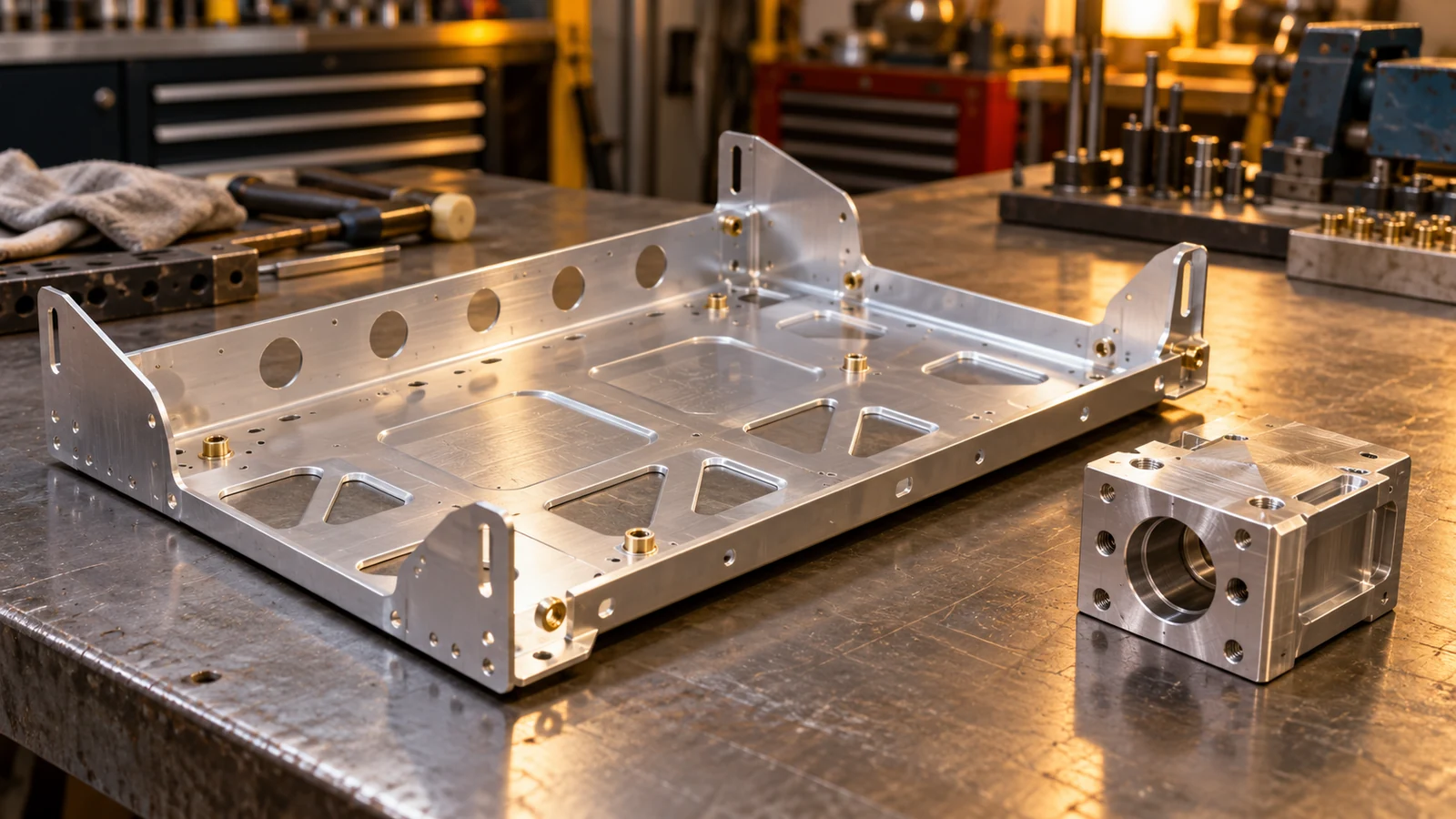
For formed construction, review bend radii, material condition, springback, hole-to-bend distance, and the sequence for installing inserts. For machined elements, review tool access, wall thickness, workholding, and the datum scheme. The CNC machining capability is a relevant route for precision interfaces when the released geometry and inspection criteria support it.
Prototype trays can be used to check equipment fit, connector access, assembly sequence, and harness routing. They do not automatically validate structural, thermal, EMC, or flight requirements. Identify the prototype’s intended use and choose a representative material and process only when those properties are part of the question.
Inspect the assembled configuration
Define acceptance characteristics for the tray itself and for the equipment installation. Tray inspection may cover mounting datums, hole patterns, panel flatness, bends, inserts, and finish. Assembly inspection may confirm equipment orientation, connector access, harness clearance, and required bonding or thermal interfaces.
Use a controlled representative fixture when the vehicle structure is not available. Record fixture revision, equipment configuration, and tray revision so the fit result can be traced. If units are simulated with mass dummies, specify which properties the dummy represents and which it does not.
Keep test evidence scoped to its purpose. A dimensional report does not prove vehicle vibration performance; an assembly fit check does not establish thermal dissipation or EMC compliance. Those require their own analysis and program-approved verification.
A useful tray is designed around installed equipment
A launch vehicle avionics tray is ready for release when equipment, connectors, harnesses, structural supports, service access, and verification are considered together. The drawing should show how the tray locates units, how cables pass through, and what must be inspected after assembly. That makes the part more than a flat mounting surface: it becomes a controlled interface for integration.